 SignetAcademic
You did the work.
Now you can prove it.
Signet documents your writing process — never your words — and gives you a verifiable certificate to submit with your paper.
Install a free Chrome extension, write in Google Docs the way you always do, and click Certify when you're done. If a professor ever questions your work, you have evidence instead of a he-said-she-said with an AI detector.
Free for students · Chrome extension · Google Docs · Open beta
Three steps.
1. Install before you start writing.
Free extension, your own Google account. Signet records quietly while you write — sessions, timing, typed versus pasted. Nothing about how you work changes.
2. Tag anything you paste in.
Paste from outside your doc and Signet asks what it is — a quote, your own notes, something from ChatGPT. Two clicks and a few words, right when it happens. Your declarations become part of the record, which means your AI use is cited, not suspected.
3. Certify and submit.
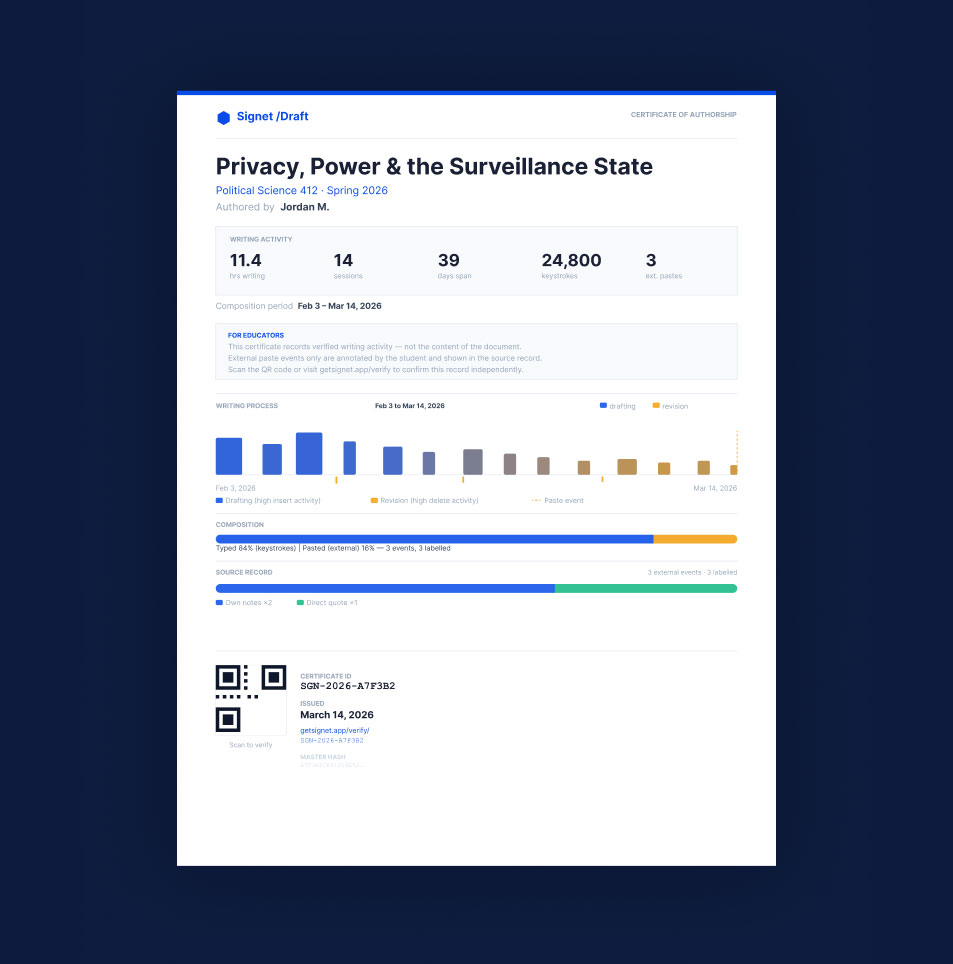
One click when the paper is done. You get two files — your document and the certificate PDF — and every certificate has a permanent verification link anyone can check in seconds, no account.
Already wrote it?
Rewind has you covered.
The paper is done. Maybe it's 2 a.m. before it's due, maybe a detector already flagged it — and you never had Signet installed while you wrote. You still have evidence: Google Docs kept your revision history the whole time.
Rewind reads that history and builds a certificate from it — when the document changed, by how much, session by session, with rendered views of your text at the significant moments. Open your document, click Rewind in the Signet chip, and you get the same two files: your document and a certificate PDF with a permanent verification link.
One honest caveat: Rewind reports are labeled Reconstructed tier — built after the fact, so they carry less assurance than a live-witnessed record. That label is on the certificate, because your professor's trust in the honest version is worth more than a stronger-looking claim. For your next paper, install first and get the full-strength record.
What it records.
What it never sees.
Recorded: when you wrote and for how long, how much was typed versus pasted, your revision patterns, and the source tags you attach to pastes. The shape of your work — the thing that's actually yours to prove.
Never collected: your words. Not one sentence, not one keystroke's identity, no clipboard contents, nothing from any site outside Google Docs. The one exception is yours to choose: revision views — images of moments from your document's history — are included only when you run Rewind or leave its witness on at certification, so verifiers can see them.
Questions students ask.
I forgot to install it and the paper is due. Am I stuck?
No — this is exactly what Rewind is for. Open the document, click Rewind in the Signet chip, and you get a Reconstructed-tier certificate built from your Google Docs revision history, revision views included.
I used ChatGPT for parts. Does that break the certificate?
No. Signet makes no judgment about AI — it documents what happened. Tag the paste, add a few words about what it was, and your AI use appears in the certificate as a citation you made at the time. Whether that fits the assignment is between you and your course policy; Signet just makes your honesty checkable.
Can my professor read my drafts through Signet?
No. The record is timing, counts, and patterns — the code that syncs data has no access to your text. The only content anyone can see is the revision views you choose to include, and you can leave those out.
What do I actually turn in?
Your paper plus the certificate PDF — both download automatically when you certify. The certificate carries a QR code and a permanent link; verification runs in the professor’s browser, no account needed.
In open beta. Your work alwasy lives in Google docs.
Signet Academic is in open beta and improving fast — and every certificate you issue during the beta stays permanently verifiable. Install before your next paper, or Rewind the one you already wrote.